:: say What?!
Just imagine yourself madly coding, madly sorting out the collected detritus of at least thirty odd years of computering, madly writing your Opus, or more likely, madly laughing at cats on Can I has cheeseburger, when all goes black.
WHAT!?! Snip...
 Debian GNU/Linux 6.0 debian-6 tty1
 debian-6 login:
 Password:
 Last login: Thu May 2 10:45:59 PDT 2013 on tty1

 Linux debian-6 2.6.32-5-amd64 #1 SMP Fri May 10 08:43:19 UTC 2013 x86_64

 The programs included with the Debian GNU/Linux system are free software; the exact distribution terms for each program are described in the individual files in /usr/share/doc/*/copyright.
...Snip WHAT!?!
Picture it: Black screen - White text - and a Delightful Message informing you of your arrival at tty1, or tty2 or tty3, etc., all depending on your gift of hitting random keys in special sequences.
There is a combination of key strokes I make, key strokes I really need to wipe from my memory. Right, part of the problem was not knowing what I did to end up with a virtual terminal on screen 1.
The other part was finally hitting upon the illusive search phrase to yield a helpful answer! TuxFiles, of late, has been the place to go. There an article by Nana Långstedt, first written in 2002 (updated 2009), makes clear and solves all the problems of my little 'verse. (Sadly TuxFiles appears to have disappeared. I'll miss them!)
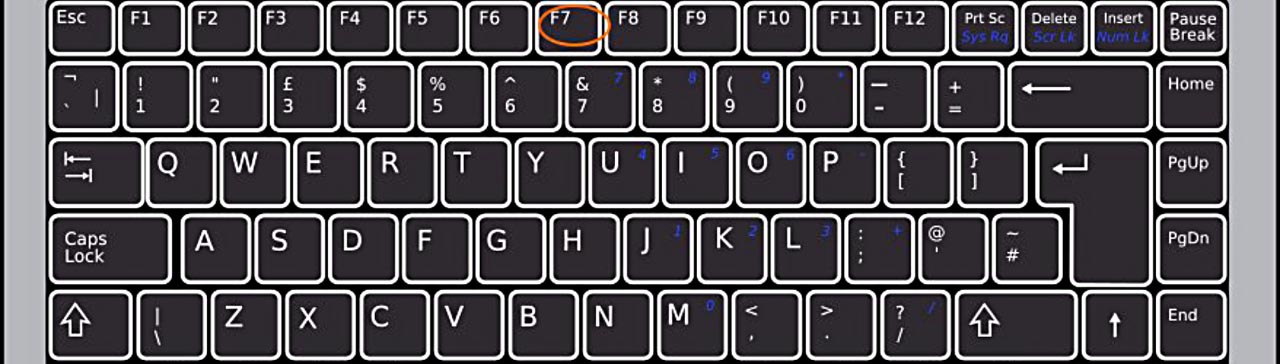
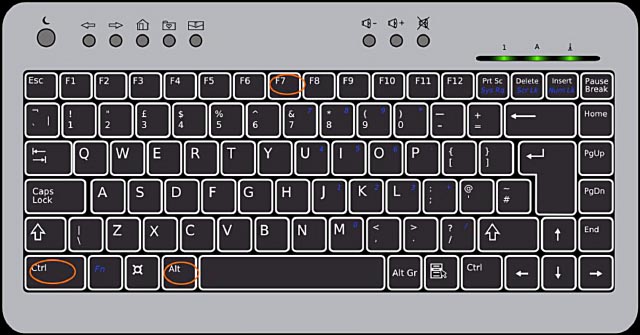
Ctrl + Alt + F1
Gets me into trouble & the wondrous combination of ...
Ctrl + Alt + F7
Rescues me and returns to the GUI without me manically hitting every combination of Ctrl + Alt my hyper fingers can reach and crying out to the Universe at large... All except, say it with me:
Ctrl + Alt + F7
A Short Explanation:
In Linux you can access six virtual terminals using F1 through F6. Debian runs X Window System in the seventh terminal. Now that I can consistently access one of terminals (not to mention finesse the return to the X Window System) I have been finding them very useful.
Wishing you calmness and strength for your day,
Zuzia,
:: muttering under her breath, Ctrl+Alt+F7, Ctrl+Alt+F7, Ctrl+Alt+F7
Stay Calm, Be Brave, Embrace Perplexity!
With love,
           _,
         ((')
        /'--)
        | _.'
 jgs   / |`=    the Little Brown Bird